Token-based authentication
As of R59 service pack 2, you can call Dayforce APIs using a token rather than a user name and a password for authentication following this flow:
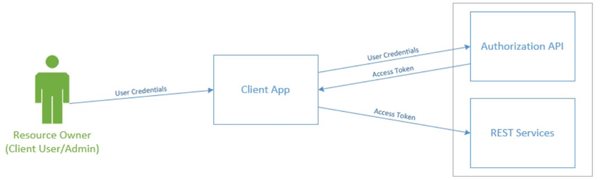
Token based authentication is available for users already configured for Web services without additional configuration.
Request a token
An authentication token can be retrieved with an API call to Dayforce Identity servers.
The call is a POST call on the following URLs:
- Production: https://dfid.dayforcehcm.com/connect/token
- Touch: https://dfid.dayforcehcm.com/connect/token
- Config: https://dfidconfig.np.dayforcehcm.com/connect/token
- Test: https://dfidtst.np.dayforcehcm.com/connect/token
- Stage: https://dfidtst.np.dayforcehcm.com/connect/token
- Train: https://dfidconfig.np.dayforcehcm.com/connect/token
You will need to join the following form body to your call:
- Grant_type: value is always: password
- CompanyId: Client namespace, used to connect to Dayforce UI or APIs
- Username: Name of the Dayforce user dedicated to Web service calls
- Password: Password of the specified user
- Client_Id: Scope of the token, the value is always: Dayforce.HCMAnywhere.Client
The content type of this body should be application/x-www-form-urlencoded.
Dayforce Identity server will check the credentials provided in the request and respond with JSON Web Token containing the token, its scope and its validity duration (in seconds).
A Curl script corresponding to a token request example:
curl --location --request POST "https://dfid.dayforcehcm.com/connect/token" --header "Content-Type: application/x-www-form-urlencoded" --data-urlencode "grant_type=password" --data-urlencode "companyId=Company123" --data-urlencode "username=WebServiceUser123" --data-urlencode "password=?@55w0rD" --data-urlencode "client_id=Dayforce.HCMAnywhere.Client"
The response JSON Web Token will be:
{

    "access_token": "eyJhbGciOiJSUzI1NiIsImtpZCI6IjYwMkZDQTBGNDk3NEUzMUE5OEEyNDBDN0QyNDA5QTFFRTU1MzE1RTQiLCJ0eXAiOiJhdCtqd3QiLCJ4NXQiOiJZQ19LRDBsMDR4cVlva0RIMGtDYUh1VlRGZVEifQ.eyJuYmYiOjE1OTIyNTgwMDksImV4cCI6MTU5MjI2MTYwOSwiaXNzIjoiaHR0cHM6Ly9kZmlkcWEubnAuZGF5Zm9yY2VoY20uY29tIiwiYXVkIjpbImRmLmhjbWFueXdoZXJlLmNsaWVudCIsImh0dHBzOi8vZGZpZHFhLm5wLmRheWZvcmNlaGNtLmNvbS9yZXNvdXJjZXMiXSwiY2xpZW50X2lkIjoiRGF5Zm9yY2UuSENNQW55d2hlcmUuQ2xpZW50Iiwic3ViIjoiMTAwMUBNRkFSVFhfMTk3NzUuZGF5Zm9yY2UuY29tIiwiYXV0aF90aW1lIjoxNTkyMjU4MDA5LCJpZHAiOiJsb2NhbCIsImRmLnVzZXJpZCI6IjEwMDEiLCJkZi5ucyI6Ik1GQVJUWF8xOTc3NSIsInByZWZlcnJlZF91c2VybmFtZSI6IkNBZG1pbiIsImRmLmN1bHR1cmUiOiJ7XCJJZFwiOjEwMzMsXCJDb2RlXCI6XCJlbi1VU1wifSIsInNjb3BlIjpbImRheWZvcmNlIiwib3BlbmlkIiwicHJvZmlsZSIsImRmLmhjbWFueXdoZXJlLmNsaWVudCJdLCJhbXIiOlsicGFzc3dvcmQiXX0.kyBxU_aPTm2Lec4yZDZ4niVlPVuEN5VoqjMa7r3e6sKrrkawi_8Hd3WWMFUchLnj90_YWNKfWY0yB1H9wfzmC2Vi250TXTIXgyKI3d3F9rEt-kJUj2VF5-C7jvfQmMZLDK_B-HGemG5oWTgRdjKS1W81q-g39cwj_mcnIZQ9QhTn7PmtbzS0vMgBnawWCfZFDd1RnXpNZn-gAQteLGl4h_HcjsJGj7ZX_uX4jy1TYFsn96exd1xXi_sAcxtOXgrF21t3bJgKC_wmTzXSnonrS81cFxeRpedXNhLTFersA7XWW8hnsscDEJNy5Fh9wepqXXTEkIzutQ-Uv0wKailaMg",

    "expires_in": 3600,

    "token_type": "Bearer",

    "scope": "dayforce df.hcmanywhere.client openid profile"

}
Expires_in indicates the validity duration of the token in seconds. The standard duration is 3600 seconds. Request a new token when needed.
Access tokens cannot be revoked, keep them safe!
Use a token for calling APIs
Once the token is obtained, you can call the regular set of Dayforce APIs using it in the authorization header, with the Bearer key word. In this case, no username or password is required.
curl --location --request GET 'https://www.dayforcehcm.com/api/Company123/v1/ClientMetadata' -- header 'Authorization: Bearer eyJhbGciOiJSUzI1[…]MyHYa7k0nvK1g'
An API call made with a token respects the security access associated with the user the token is attached to.
To optimize performance, re-use the same token until it is ready to expire rather than getting a new token for each API request.
Postman collection
Use the following Postman collection to try requesting a token and using it on the Dayforce sample environment.
{
	"info": {
		"_postman_id": "bbefe57a-dfed-40ca-af66-d5cec5773c8c",
		"name": "Token based authentication",
		"schema": "https://schema.getpostman.com/json/collection/v2.1.0/collection.json"
	},
	"item": [
		{
			"name": "Get Token",
			"event": [
				{
					"listen": "test",
					"script": {
						"exec": [
							"const jsonData = pm.response.json();\r",
							"console.log(jsonData);\r",
							"pm.collectionVariables.set(\"access_token\", jsonData.access_token);"
						],
						"type": "text/javascript"
					}
				}
			],
			"request": {
				"method": "POST",
				"header": [],
				"body": {
					"mode": "urlencoded",
					"urlencoded": [
						{
							"key": "grant_type",
							"value": "password",
							"type": "text"
						},
						{
							"key": "companyId",
							"value": "ddn",
							"type": "text"
						},
						{
							"key": "username",
							"value": "DFWSTest",
							"type": "text"
						},
						{
							"key": "password",
							"value": "DFWSTest",
							"type": "text"
						},
						{
							"key": "client_id",
							"value": "Dayforce.HCMAnywhere.Client",
							"type": "text"
						}
					]
				},
				"url": {
					"raw": "https://dfidtst.np.dayforcehcm.com/connect/token",
					"protocol": "https",
					"host": [
						"dfidtst",
						"np",
						"dayforcehcm",
						"com"
					],
					"path": [
						"connect",
						"token"
					]
				}
			},
			"response": []
		},
		{
			"name": "Call EmployeeEndpoint",
			"event": [
				{
					"listen": "prerequest",
					"script": {
						"exec": [
							""
						],
						"type": "text/javascript"
					}
				}
			],
			"protocolProfileBehavior": {
				"followAuthorizationHeader": true
			},
			"request": {
				"auth": {
					"type": "bearer",
					"bearer": [
						{
							"key": "token",
							"value": "{{access_token}}",
							"type": "string"
						}
					]
				},
				"method": "GET",
				"header": [],
				"url": {
					"raw": "https://test.dayforcehcm.com/api/ddn/v1/Employees",
					"protocol": "https",
					"host": [
						"test",
						"dayforcehcm",
						"com"
					],
					"path": [
						"api",
						"ddn",
						"v1",
						"Employees"
					]
				}
			},
			"response": []
		}
	],
	"auth": {
		"type": "bearer"
	},
	"event": [
		{
			"listen": "prerequest",
			"script": {
				"type": "text/javascript",
				"exec": [
					""
				]
			}
		},
		{
			"listen": "test",
			"script": {
				"type": "text/javascript",
				"exec": [
					""
				]
			}
		}
	],
	"variable": [
		{
			"key": "access_token",
			"value": ""
		}
	]
}