Configure Org-Level Access
In order to configure access to locations and subsequent employees, go to
System Admin >
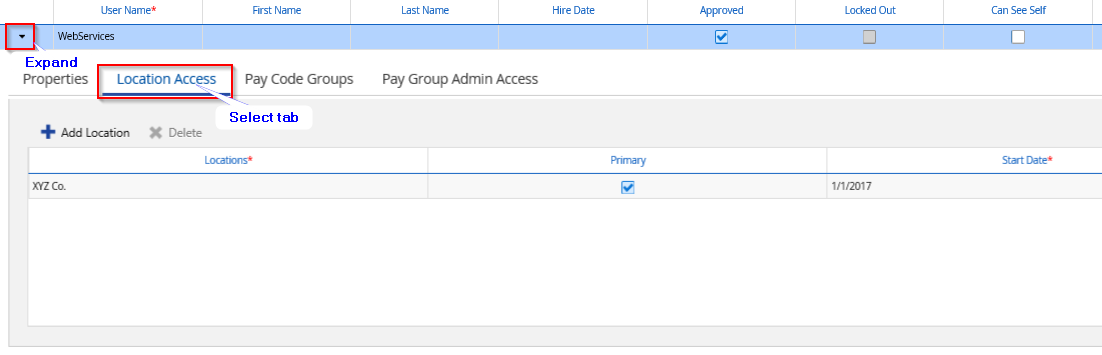
User and search for the user used by your consumming application. Expand it and select the
Location Access tab:
Click on
Add Location and select the relevant location
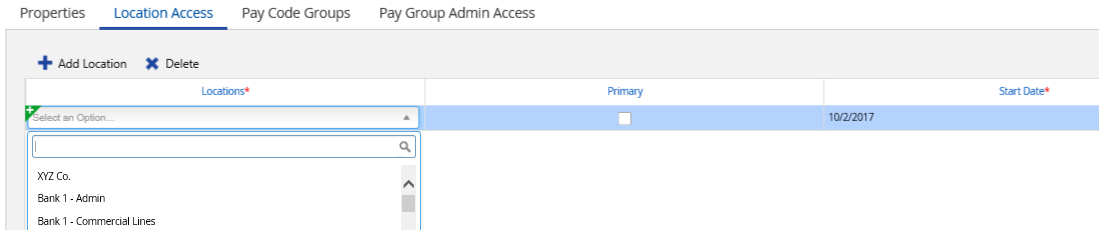
Several locations can be added through this process. One location needs the
Primary box to be checked.
Locations have different possible levels (on-site department, site, region, company, etc.). There is no restriction on the level of the locations that can be assigned to a user. If the consumming application needs access to all employees, select the company level location.