Configure Role Assignment for Post and Patch
POSTing a new hire requires the web services user role to be able to assign the relevant role to the new hire record. The relevant role must be assigned to the web service user role in System Admin > Roles.
PATCHing existing employee roles also requires these roles to be assigned to the web service user role in System Admin > Roles.
For example, if a consuming application needs to post employees assigned to “Canadian Associate” or “Canadian Manager” roles, or to assign existing employees to these roles, they need to be assigned to the Web Services role:

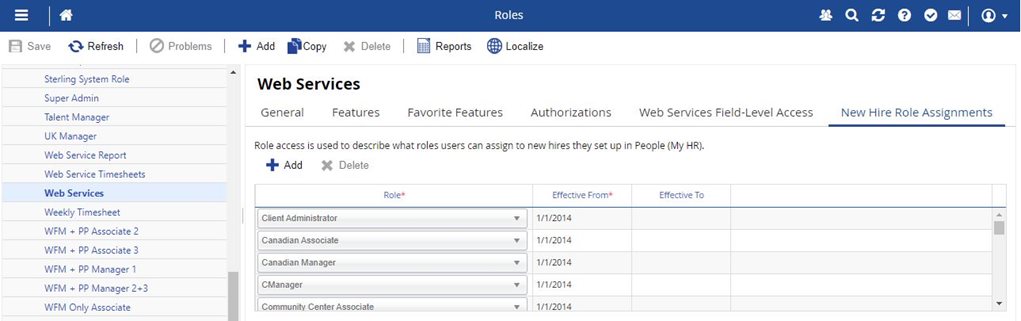
In addition to assigning roles under New Hire Role Assignments, you must enable Can Create, Can Read, or Can Update for User Information under Authorizations tab of System Admin > Roles.
User Information controls what access users have to create, or update user accounts in Dayforce.
- Select Can Create and users can create user accounts.
- Select Can Update and users can modify existing user accounts.